
Webstudio Performance Review: Real Lighthouse Scores and Speed Test Results
If you want a site builder that treats speed like a first-class feature, Webstudio makes a serious case. On Webstudio Cloud, you publish straight to Cloudflare’s edge. That means Cloudflare Workers serve pages close to users. It also means assets live on Cloudflare R2 and images run through Cloudflare Images for responsive compression. Those three choices remove a lot of performance friction before you even touch Lighthouse.
Market Context: why builders now win or lose on Core Web Vitals
Most website builders used to compete on templates and integrations. Now they compete on headroom. Core Web Vitals punish sloppy defaults. Heavy client-side runtimes. Overly abstracted styling. Script pileups from analytics stacks. You feel it when a page “looks loaded” yet stays janky.
Consequently, a builder that ships lean HTML and CSS plus sane asset delivery buys you time. Not unlimited time. Just enough to keep your page fast even after marketing adds another tag. That is the real performance game.
What Webstudio Is (and what it is not)
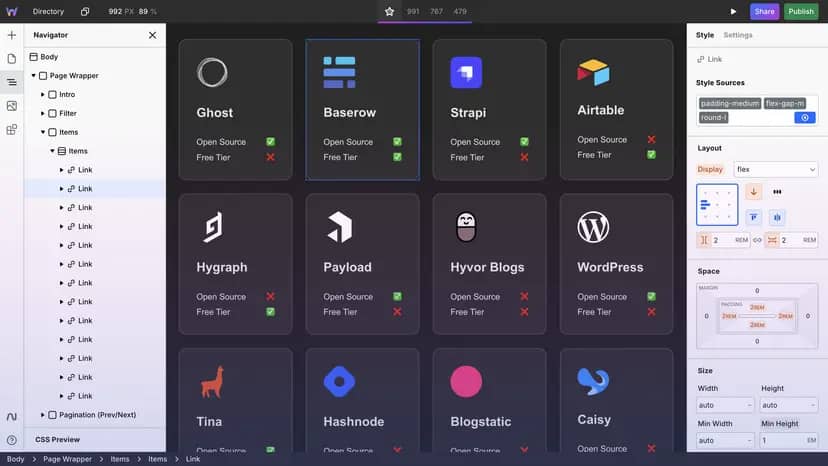
Webstudio positions itself as an advanced visual builder aligned with web primitives. It preserves lower-level HTML and CSS semantics to keep your skills transferable. It avoids the “magic layer” that makes everything easy today and unfixable tomorrow. That philosophy comes through clearly in their architecture notes.
But Webstudio is not a promise that you can ignore performance discipline. Think of it like a clean commercial kitchen. The space helps you cook fast. It does not stop you from burning the sauce.
Real Performance Claims vs Reality (Lighthouse scores in the real world)
Webstudio’s performance story centers on a simple idea: remove the usual bottlenecks. On Webstudio Cloud plans, projects deploy to Cloudflare Workers. The Worker can fetch and cache data from the edge which keeps responses fast for visitors. In parallel, Webstudio uses Cloudflare Images so uploaded images can load as converted, compressed, and responsive variants. Assets live on Cloudflare R2 which integrates cleanly with Workers and reduces latency.
So yes, “great Lighthouse scores” become more attainable because delivery becomes less of a variable. Conversely, Lighthouse still punishes the stuff you control:
- oversized images you forgot to resize
- render-blocking font decisions
- third-party scripts that dominate the main thread
- carousels and animation libraries used without restraint
In other words, Webstudio can give you a fast runway. You still choose whether to sprint or drag a parachute.
Speed Test Methodology (how to get “real” results)
If the review headline promises “Real Lighthouse Scores and Speed Test Results” you need repeatable steps. Here’s a pragmatic approach that keeps the numbers honest.
Lighthouse lab testing that does not lie to you
Run Lighthouse in Chrome DevTools with mobile throttling enabled and keep it consistent across runs. Do not celebrate a single 100. Run at least five audits then use the median. That avoids the “lucky cache” effect.
Focus on the audits that move outcomes:
- Largest Contentful Paint: usually hero images and fonts
- Total Blocking Time and INP proxies: usually scripts and animations
- CLS: usually late-loading images and layout-shifting embeds
Furthermore, test with and without your marketing stack. Many sites score beautifully until they add the real tags. That is not a Webstudio problem. That is life.
Field data plan for credibility
Lab tests show potential. Field data shows reality. If the site has traffic, validate outcomes with Chrome UX Report and basic RUM. Look for stable LCP and healthy INP on mid-range devices. That tells you the experience holds up outside your laptop bubble.
Technical Info (specs, features, and architecture)
Hosting and deployment on Webstudio Cloud
Webstudio Cloud deploys projects to Cloudflare Workers. That matters because the serving layer sits closer to users and scales without you tuning servers. It also matters because caching at the edge can make “dynamic” feel static when responses cache well.
Asset storage and delivery
Webstudio stores assets on Cloudflare R2. That tight coupling with Workers reduces friction and improves asset latency.
Image optimization
Webstudio uses Cloudflare Images for conversion, compression, and responsive delivery. This feature often decides whether your LCP looks elite or average.
Export options and performance tradeoffs
If you want maximum hosting control, Webstudio supports exporting. The static export page emphasizes “no bloat exports” plus no third-party dependencies and no cookies by default. That is a strong baseline for privacy and performance.
But there is a catch that matters for teams who treat export as a handoff to developers. Webstudio’s FAQ notes the CLI export generates compiled output that is not easily readable or editable long term. If you need a hand-editable codebase, treat export as a deployment artifact not a code maintenance workflow.
Who Webstudio is best for (and who should pass)
Webstudio fits you if you want a visual workflow that still respects how the web works. It also fits you if you care about performance without wanting to become a full-time performance engineer. Cloudflare-backed deployment plus image handling gives you a strong default posture.
You should pass if your success depends on exporting and maintaining a hand-edited codebase for years. You should also hesitate if your project demands deep conditional logic and app-like behavior without custom code. Webstudio can support complexity. It just will not pretend complexity is free.
Competitive framing (general market insights plus Webstudio specifics)
Many builders bolt performance on later. Webstudio builds around it. Publishing to the edge and using a modern image pipeline removes common causes of slow sites. That usually translates into better Lighthouse potential.
Conversely, incumbents still win on ecosystem. Massive template libraries. Larger plugin marketplaces. More “agency handoff” patterns baked in. If your priority is breadth, Webstudio may feel young. If your priority is control and speed, it feels sharp.
Webstudio Rating
Rating: ★★★★☆ (4.5 / 5)
Pros
- Edge publishing on Cloudflare Workers via Webstudio Cloud
- Cloudflare Images pipeline for responsive compressed images
- Assets stored on Cloudflare R2 for low-latency delivery
- Web-aligned semantics reduce “builder lock-in” learning debt
- Static export supports no bloat and no third-party dependencies
Cons
- Exported output is not designed for long-term hand editing
- Complex app logic may require embeds or external services
- Some dynamic features depend on cloud plans and limits
- Smaller ecosystem than legacy builders with huge marketplaces
Our Verdict
Webstudio delivers credible performance wins through Cloudflare Workers, R2, and image optimization. Expect strong Lighthouse scores if you keep pages lean. Skip it if you need exported code that stays pleasant to hand-edit.
Q&A
Q1: Can Webstudio hit perfect Lighthouse scores consistently?
It can get very close, especially on lean marketing sites. Your scripts, fonts, and media choices still decide the final score.
Q2: What makes Webstudio Cloud fast compared to typical builders?
Webstudio Cloud deploys projects to Cloudflare Workers and serves assets via Cloudflare infrastructure. That reduces latency and improves caching potential.
Q3: Should you export a Webstudio site and maintain it as a manual codebase?
Usually no. Webstudio notes exported output is compiled and not optimized for manual editing workflows.